
Remote agents (A2A & AG-UI)
Moka doesn’t have to call a model directly. Point a workspace at an agent and Moka becomes its front end: streaming chat, A2UI rendering, tool cards, approvals and a full event trace in the inspector.
| Protocol | Good for | Conversation state |
|---|---|---|
| A2A (Agent2Agent) | Agents that publish an agent card: Google ADK, A2A SDK agents, many enterprise agents | Kept by the agent (Moka sends contextId / taskId) |
| AG-UI | LangGraph, CopilotKit, Mastra, Pydantic AI, CrewAI… | Sent by Moka every turn (full history + agent state) |
Try it in a minute
Section titled “Try it in a minute”-
Start the bundled demo agent. It speaks both protocols:
Terminal window npx @mokalabs/sandbox demo-agent # A2A card on :4100, AG-UI at /agui -
In Moka, open Settings → Agents → Connect an agent and pick Moka demo agent · A2A (or AG-UI).
-
Choose it in the model menu in the top bar (agents are listed under the models), and ask “book a tasting”.
You’ll get an A2UI booking form from the agent. Pressing Book it sends the action back to the agent, which confirms the booking.
LangGraph with generative UI
Section titled “LangGraph with generative UI”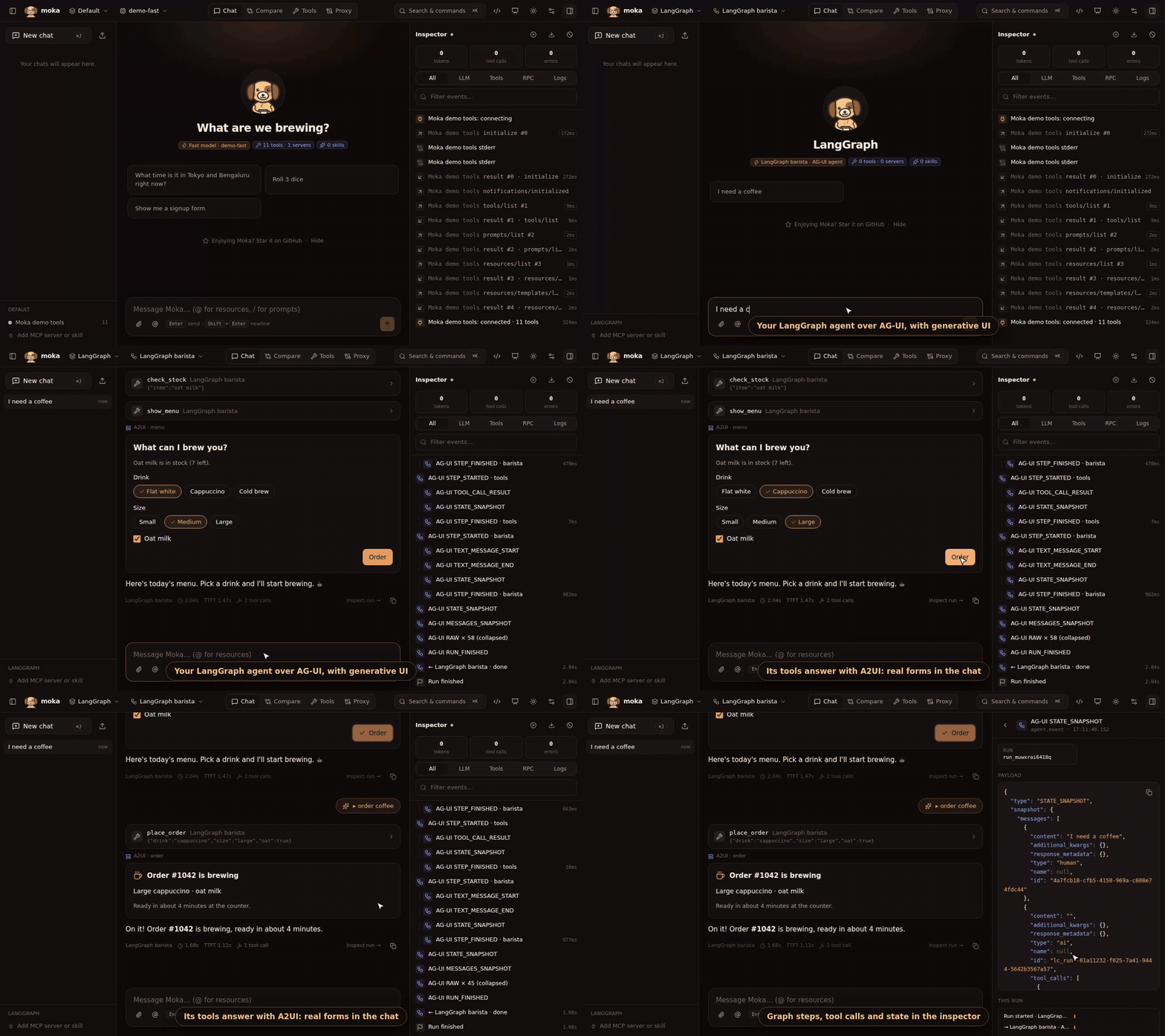
examples/langgraph-a2ui is a small LangGraph graph served with ag-ui-langgraph. Its tools return A2UI, so the chat shows a menu form and an order card, and the form’s Order button goes back to the graph as a [ui action] message.
pip install -r requirements.txtpython agent.py # AG-UI endpoint on http://127.0.0.1:8123/agentnpx @mokalabs/sandbox # from the example folder: uses its moka.jsonIt uses a scripted model so it runs without API keys. Swap in any LangChain chat model to use a real one.
Configure
Section titled “Configure”{ "agents": [ { "id": "support", "name": "Support agent", "protocol": "a2a", "url": "https://agents.example.com/support/.well-known/agent-card.json", "headers": { "Authorization": "Bearer ${SUPPORT_AGENT_TOKEN}" } }, { "id": "research", "name": "Research graph", "protocol": "ag-ui", "url": "http://localhost:8000/agent", "shareTools": true } ], "workspaces": [ { "id": "demo", "name": "Support demo", "agentId": "support", "mcpServerIds": [], "skillIds": [] } ]}| Field | |
|---|---|
protocol | a2a or ag-ui |
url | A2A: the agent card URL (Moka reads the endpoint from it) or the JSON-RPC endpoint itself. AG-UI: the URL you POST RunAgentInput to |
headers | Extra request headers; values support env:NAME and ${NAME} |
shareTools | AG-UI only: offer the workspace’s MCP tools and render tool as frontend tools (below) |
A workspace uses its agentId instead of llmId. Test in the agent form shows the agent card (skills, streaming, A2UI support) or a short AG-UI run.
Moka sends message/stream (SSE), or message/send when the card says the agent doesn’t stream, and renders:
- Text from agent messages, status updates and streamed artifacts.
- A2UI from DataParts (
mimeType: application/json+a2ui). Moka activates the A2UI extension with theX-A2A-Extensionsheader when the card declares it. - Other data parts as expandable JSON cards, and file parts as links.
Button presses on A2UI surfaces go back as a DataPart: { "version": "v0.9", "action": {…}, "userAction": {…} }. Attachments are sent as FileParts. The contextId (and taskId while a task is input-required) is carried across turns automatically.
Moka POSTs RunAgentInput (thread id, full message history, agent state, tools) and reads the event stream:
TEXT_MESSAGE_*→ streaming text,THINKING_*/REASONING_*→ reasoningTOOL_CALL_*andTOOL_CALL_RESULT→ tool cardsSTATE_SNAPSHOT/STATE_DELTA→ agent state, sent back on the next turnCUSTOM,ACTIVITY_SNAPSHOTorRAWevents that carry A2UI → rendered surfacesRUN_ERROR→ an error in the chat
A2UI button presses arrive as a [ui action] {…} user message.
Give an AG-UI agent your MCP tools
Section titled “Give an AG-UI agent your MCP tools”With shareTools, the workspace’s MCP tools (and the render tool) are sent as AG-UI frontend tools. When the agent calls one:
- Moka runs it against the MCP server, with approvals if they apply.
- The result is added to the history as a tool message, and the run continues automatically.
So a LangGraph agent in development can use GitHub, your filesystem or your company’s MCP servers without any wiring in the agent.
Inspector
Section titled “Inspector”Agent runs show up as agent.request (what Moka sent), agent.event (each A2A result or AG-UI event) and agent.response, plus the usual tool.* events for frontend tools.
Events are grouped by graph node: everything between STEP_STARTED and STEP_FINISHED for a node (tool calls, state deltas, messages) is nested under it, and the finished step shows the node’s duration. AG-UI doesn’t tag events with a step id, so when a node starts while another is still running (parallel branches or a subgraph) Moka labels it · overlaps <node> and nests the following events under the most recent node: treat that grouping as best-effort.
Some adapters re-emit every framework event as an AG-UI RAW event (ag-ui-langgraph does this by default, often dozens per run). Moka collapses them into a single AG-UI RAW × N (collapsed) entry just before RUN_FINISHED; click it to see the first 200. RAW events that carry A2UI are still rendered. To skip them at the source with LangGraph, pass emit_raw_events=False to LangGraphAgent.