
Proxy for your AI editor
Moka’s inspector shows the traffic of its own chat. The Moka proxy shows the traffic of other clients: GitHub Copilot in VS Code, Cursor, Claude Desktop, Claude Code, Windsurf, Gemini, or anything else that starts MCP servers from a config file.
The proxy sits between the client and a server. Every byte passes through untouched, and every JSON-RPC message is recorded. Moka’s Proxy tab shows it all, grouped by client and server, with the same pairing, latencies, timeouts and late replies as the inspector.
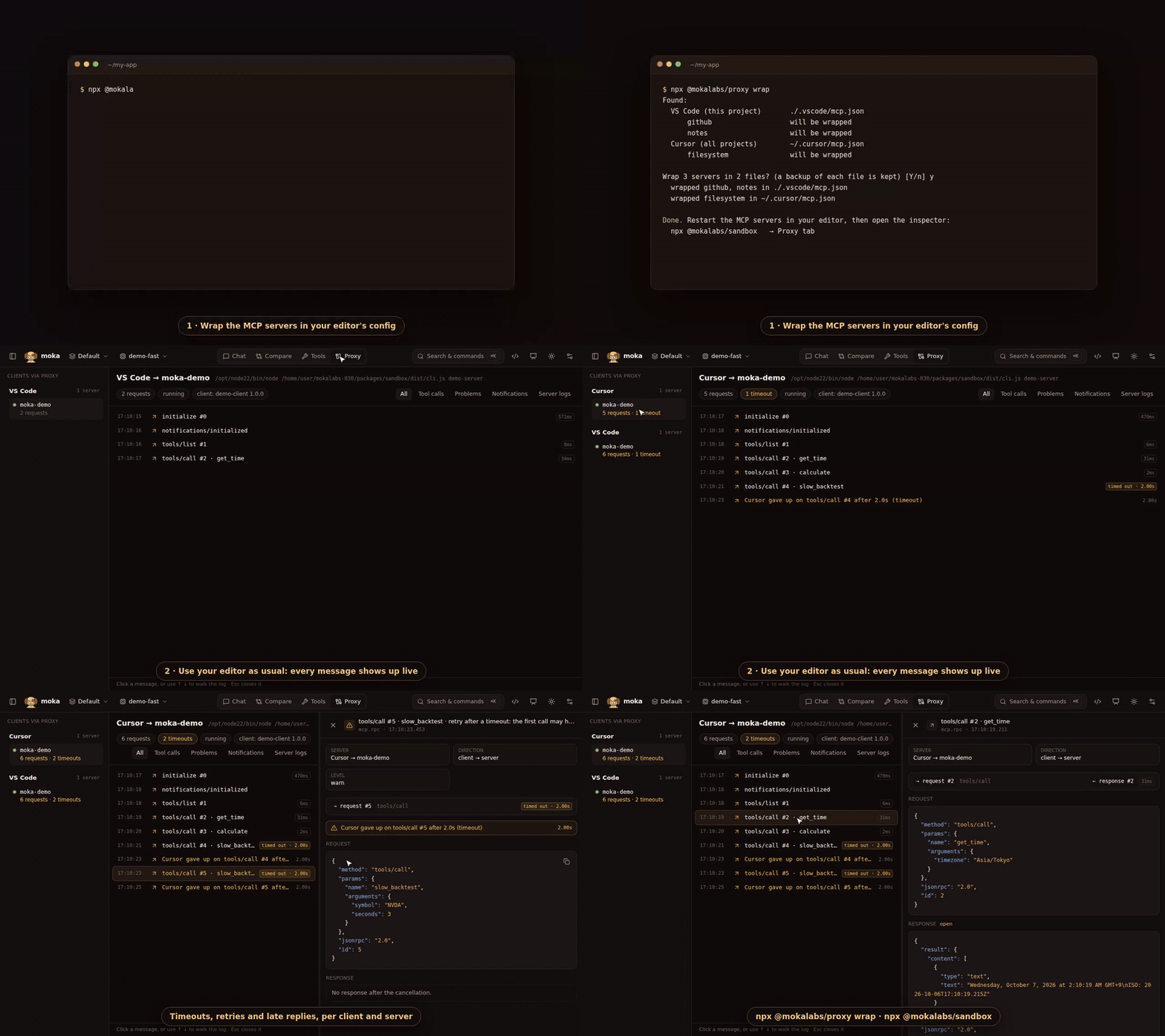
Set it up
Section titled “Set it up”npx @mokalabs/proxy wrap # find your client configs and wrap their serverswrap looks at each client’s global config and at the project configs in the folder you run it from (it never searches the rest of your disk). It lists what it found and asks before changing anything:
Found:  VS Code (this project)       ./.vscode/mcp.json      github                   will be wrapped      docs                     skipped: HTTP servers aren't supported yet  Cursor (all projects)        ~/.cursor/mcp.json      filesystem               will be wrapped
Wrap 2 servers in 2 files? (a backup of each file is kept) [Y/n]
Then restart the MCP servers in your editor (or reload its window) and open Moka:
npx @mokalabs/sandbox # → Proxy tabUse your editor as usual: its messages show up as they happen. Moka can start before or after the editor; it reads the recorded sessions either way.
| Client | Global config | Project config |
|---|---|---|
| VS Code / GitHub Copilot | mcp.json in VS Code’s user folder | .vscode/mcp.json |
| Cursor | ~/.cursor/mcp.json | .cursor/mcp.json |
| Claude Desktop | claude_desktop_config.json | |
| Claude Code | .mcp.json | |
| Windsurf | ~/.codeium/windsurf/mcp_config.json | |
| Gemini CLI | ~/.gemini/settings.json | .gemini/settings.json |
| Gemini | ~/.gemini/config/mcp_config.json |
Another file? Name it: npx @mokalabs/proxy wrap path/to/mcp.json. Pick servers with --only github,filesystem, preview with --dry-run, and skip the question with --yes. Running the proxy from a clone or a global install? --local makes the configs start that copy (node …/proxy/dist/cli.js) instead of npx @mokalabs/proxy.
What wrap changes
Section titled “What wrap changes”Only the command and args of each server entry. Comments, formatting and other fields (env, cwd, type) stay as they were:
"github": { "type": "stdio", "command": "npx", "args": [ "-y", "@mokalabs/proxy", "--client", "vscode", "--name", "github", "--", "npx", "-y", "@modelcontextprotocol/server-github" ]}Everything after -- is your original command. Wrapping twice changes nothing, and the first change to each file saves a copy next to it (mcp.json.moka-backup).
npx @mokalabs/proxy status # what's wrapped, and wherenpx @mokalabs/proxy unwrap # put your configs back (then restart the servers)The Proxy tab
Section titled “The Proxy tab”- Clients via proxy: each client and its servers. Click a server for its traffic, or the client for all its servers in one timeline.
- The log: every request with its latency, or timed out, late reply, no response or error. When the client gives up on a request you see “VS Code gave up on tools/call #8 after 60.0s (timeout)”.
- Retries: a
tools/callthat repeats an earlier one (same tool, same arguments) after a timeout, a cancellation or no response is flagged: “retry after a timeout: the first call may have run”. For tools that write, that’s how duplicates happen. - Server logs: whatever the server writes to stderr.
- Click any row (or use ↑ ↓) to see the request and response side by side.
- Export downloads what you’re looking at as JSON (see below).
The client’s name comes from --client, and its exact name and version from its initialize message.
Export what was recorded
Section titled “Export what was recorded”Share a trace in a bug report, or keep it next to a failing test. In the Proxy tab, Export downloads everything recorded for what’s shown (one server, or all of a client’s servers) as one JSON file. The download icon next to Clients via proxy exports every session. From a terminal:
npx @mokalabs/proxy export # every recorded session → moka-proxy-<date>.jsonnpx @mokalabs/proxy export --client vscode --name github --since 24h -o trace.jsonnpx @mokalabs/proxy export -o - | jq '.sessions[0].records | length'The file holds every line of each session log, in order: the start record (command, args, client, server name), each JSON-RPC message in both directions with its timestamp, raw lines that weren’t JSON, server stderr, and the exit.
Exports are redacted by default: values of keys like apiKey, token, password or Authorization, flags like --token, NAME_TOKEN=… pairs, bearer tokens and well-known key formats (sk-…, ghp_…, AKIA…) become "<redacted>". Methods, ids, timings and the rest of each message stay as they were. Use Export as recorded (or --raw) for the untouched file, and keep it to yourself.
Without wrap
Section titled “Without wrap”Put the proxy in front of any server by hand:
npx @mokalabs/proxy --client my-app --name notes -- node notes-server.jsIt never writes to stdout itself (that belongs to the protocol), and if the log can’t be written it keeps passing messages through. The server’s exit code is passed back to the client.
Limits
Section titled “Limits”- Local (stdio) servers only for now. HTTP servers are skipped by
wrap. - The proxy sees what the client and server send each other, not the model’s prompt. For the model side, use Moka’s own chat and inspector.
- Cloud agents (like the Copilot coding agent on github.com) don’t run servers on your machine, so they can’t be proxied.