
Models & providers
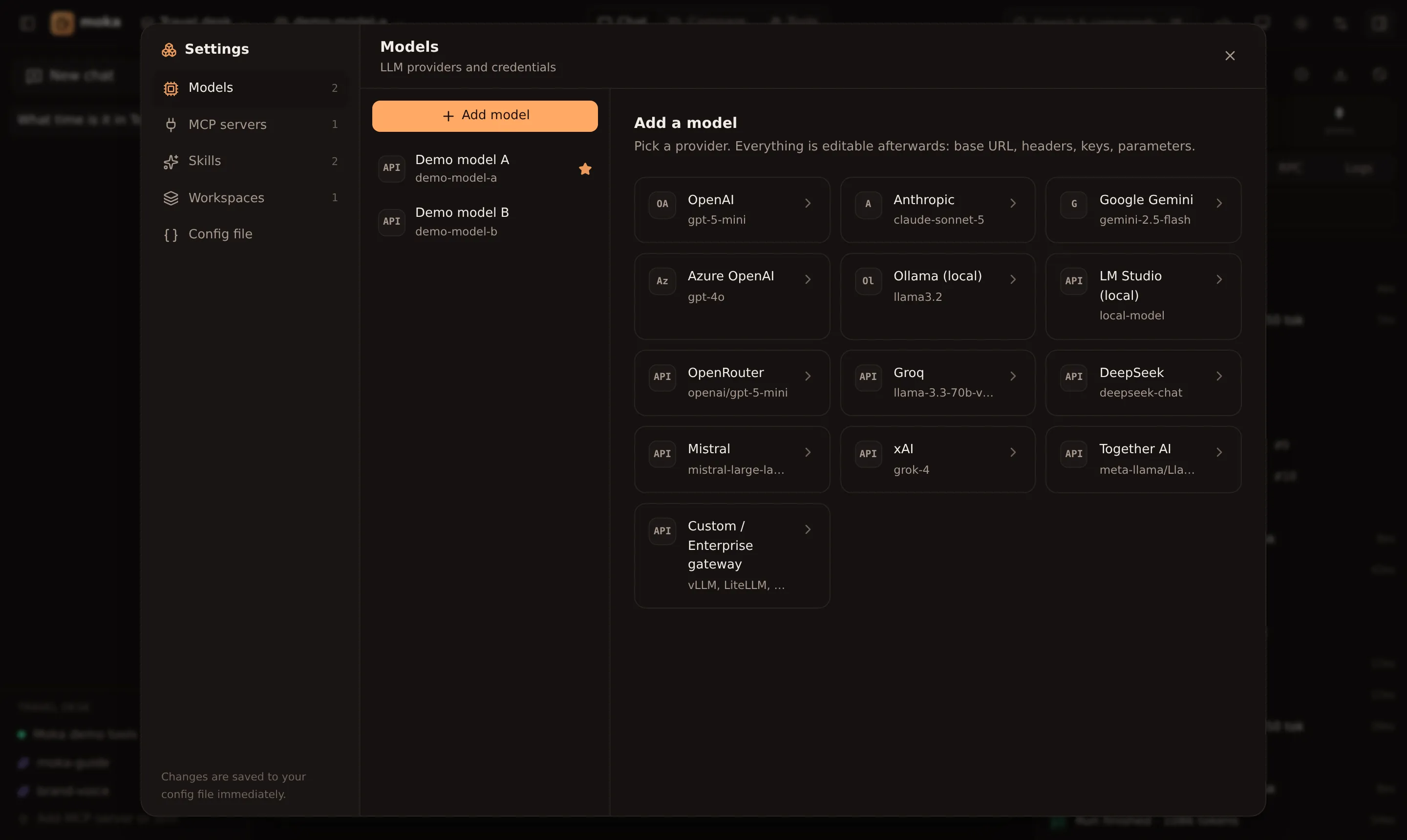
Add a model
Section titled “Add a model”- Open Settings → Models → Add model (or the model menu in the top bar → Add a model…).
- Pick a preset. A green key found badge means Moka already sees the right environment variable.
- Adjust the model name — or click Fetch models to list everything your key can access.
- Click Test. Moka sends a tiny prompt and shows the reply and latency.
The first model you add becomes the default for the active workspace. Switch models any time from the top bar.
Local models: on first run, Moka adds Ollama and LM Studio (port 1234) if they’re running. Later, Settings → Models says when one is running but not added yet, with its loaded models one click away. Replies without tool calls show their speed in tokens per second, in the chat and in Compare.
Built-in presets
Section titled “Built-in presets”| Preset | Provider type | Key variable | Base URL |
|---|---|---|---|
| OpenAI | openai | OPENAI_API_KEY | default |
| Anthropic | anthropic | ANTHROPIC_API_KEY | default |
| Google Gemini | google | GOOGLE_GENERATIVE_AI_API_KEY or GEMINI_API_KEY | default |
| Azure OpenAI | azure | AZURE_API_KEY + AZURE_RESOURCE_NAME | from resource name |
| Ollama | ollama | — | http://localhost:11434/v1 |
| LM Studio | openai-compatible | — | http://localhost:1234/v1 |
| OpenRouter | openai-compatible | OPENROUTER_API_KEY | https://openrouter.ai/api/v1 |
| Groq | openai-compatible | GROQ_API_KEY | https://api.groq.com/openai/v1 |
| DeepSeek | openai-compatible | DEEPSEEK_API_KEY | https://api.deepseek.com/v1 |
| Mistral | openai-compatible | MISTRAL_API_KEY | https://api.mistral.ai/v1 |
| xAI | openai-compatible | XAI_API_KEY | https://api.x.ai/v1 |
| Together AI | openai-compatible | TOGETHER_API_KEY | https://api.together.xyz/v1 |
| Custom / Enterprise | openai-compatible | your choice | your gateway |
On first run, Moka creates a profile for every key it finds in your environment, plus Ollama if it’s running.
API keys
Section titled “API keys”You can paste a key or reference an environment variable:
| Value | Meaning |
|---|---|
sk-live-… | A literal key, saved to your config file (with 0600 permissions) |
env:OPENAI_API_KEY | Read from the environment at request time — never written to disk |
Bearer ${TOKEN} | Interpolate a variable inside a string (works in headers too) |
Enterprise gateways
Section titled “Enterprise gateways”Anything that speaks the OpenAI Chat Completions API works: vLLM, LiteLLM, Portkey, Kong, Azure APIM, AWS Bedrock Access Gateway, or your in-house proxy.
{ "id": "gateway", "name": "Company gateway", "provider": "openai-compatible", "baseURL": "https://llm.internal.example.com/v1", "model": "llama-3.3-70b", "apiKey": "env:GATEWAY_KEY", "headers": { "X-Team": "platform", "X-Request-Source": "moka" }}Native providers accept a baseURL override too, so you can route OpenAI or Anthropic traffic through a proxy while keeping their full feature set.
Some gateways add their own events to the response stream, such as timings ({"ttft": …, "elapsed_time": …}). Moka skips events that aren’t completion chunks or errors, so these gateways stream normally. Azure OpenAI’s newer models (GPT-5, o-series) reject max_tokens; Moka notices and sends max_completion_tokens instead. If a gateway’s streaming is unreliable in other ways, turn off Stream responses under the model’s Advanced options ("stream": false in moka.json): Moka then asks for each reply in one response and shows it all at once. If your gateway uses a certificate from your company’s own authority, see Corporate networks.
Advanced options
Section titled “Advanced options”Toggle Advanced in the model form:
- Temperature and Max output tokens — leave unset for provider defaults.
- Custom headers — sent with every request; values support
env:and${VAR}. - Use Chat Completions API (OpenAI only) — Moka uses the Responses API by default; switch for older models or proxies.
- Provider options (JSON) — passed straight through as AI SDK
providerOptions:
{ "openai": { "reasoningEffort": "low" } }{ "anthropic": { "thinking": { "type": "enabled", "budgetTokens": 4000 } } }{ "google": { "safetySettings": [{ "category": "HARM_CATEGORY_DANGEROUS_CONTENT", "threshold": "BLOCK_ONLY_HIGH" }] } }Reasoning output from models that support it appears in a collapsible Reasoning block in the chat.
Azure OpenAI
Section titled “Azure OpenAI”Set the model field to your deployment name, and fill in the resource name (the xyz in https://xyz.openai.azure.com) or reference env:AZURE_RESOURCE_NAME. Optionally set an API version.