
Tool tests
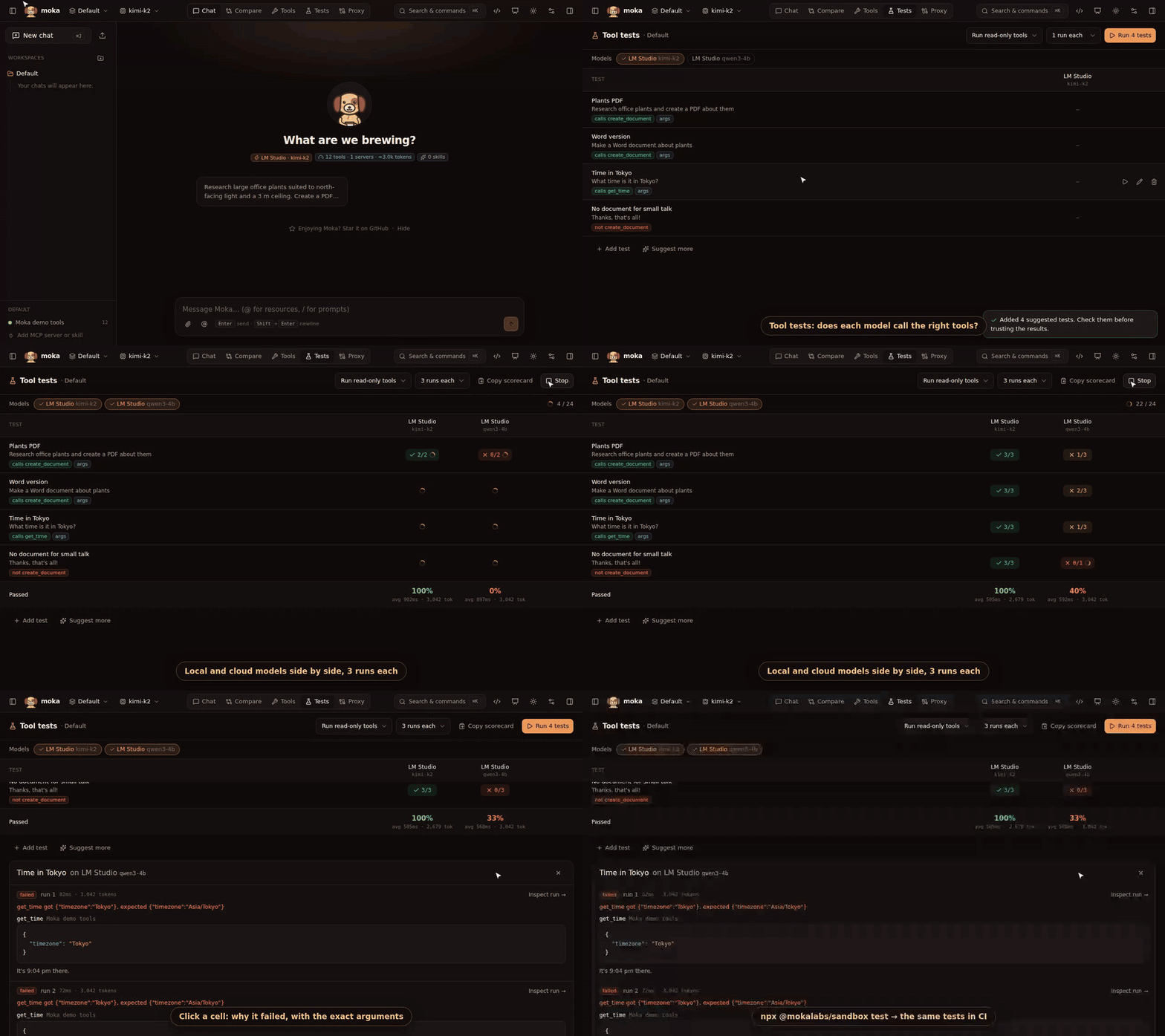
An MCP server can pass every protocol check and still be hard for models to use: a vague description, an ambiguous parameter, two tools that sound alike. Tests (top bar) tells you how real models do with your tools, before your users find out.
A test is a prompt and what should happen:
| Must call | Tools the model has to call (any order) |
| Must not call | Tools it shouldn’t touch, e.g. no create_document for “thanks!” |
| With arguments | Arguments the tools must get, as JSON by tool name: {"get_time": {"timezone": "Asia/Tokyo"}}. Partial match; strings ignore case |
| Answer mentions | Words the final answer must contain |
Run them
Section titled “Run them”- Open Tests and click Suggest tests: the workspace’s model reads your tools and writes a first set, typical requests plus a few “don’t use this tool” cases. Check them, edit them, or Add test by hand.
- Pick the models to compare (local ones too: LM Studio, Ollama) and how many runs each. Models aren’t deterministic, so 3 runs show whether a pass was luck.
- Click Run. The grid fills in as runs finish:
3/3passed every time,1/3is flaky,0/3never. - Click a cell to see each run: why it failed, the tool calls and their arguments, the answer, and Inspect run for every step in the inspector.
Copy scorecard copies the results as a Markdown table, for a PR, an issue or a README.
Tools that write
Section titled “Tools that write”By default, only tools marked read-only (readOnlyHint) really run. A tool that may write (send an email, delete a file) isn’t called. The model is told it ran and carries on, so the test still checks which tool it picked and with what.
| Mode | What runs |
|---|---|
| Run read-only tools (default) | Tools marked read-only; the others are skipped |
| Run every tool | Everything. Only against test data |
| Run no tools | Nothing: only the model’s choices are checked |
In CI: moka test
Section titled “In CI: moka test”Tests are saved in the workspace, in your moka.json. Commit it next to your server, and run the same tests from the command line:
npx @mokalabs/sandbox test moka.json --models qwen3-4b,gpt-5-mini --runs 3 Testing 4 tests × 2 models × 3 runs in Default (tools: read-only)
✓ LM Studio (qwen3-4b) Time in Tokyo #1 1.2s ✗ LM Studio (qwen3-4b) Time in Tokyo #2 1.4s get_time got {"timezone":"Tokyo"}, expected {"timezone":"Asia/Tokyo"} … 22/24 92% OpenAI (gpt-5-mini) avg 1.8s · 2410 tokens 17/24 71% LM Studio (qwen3-4b) avg 1.3s · 2380 tokensIt exits with code 1 if any run fails, so it can gate a pull request.
| Option | |
|---|---|
-m, --models <a,b> | Model ids, names or model names (default: the workspace’s model) |
-w, --workspace <id> | Workspace (default: the active one) |
--runs <n> | Runs per test and model, 1–20 (default 1) |
--tools <mode> | read-only (default), run or none |
--json | Results as JSON, for your own reports |
name: Tool testson: [pull_request]jobs: test: runs-on: ubuntu-latest steps: - uses: actions/checkout@v4 - uses: actions/setup-node@v4 with: { node-version: 22 } - run: npx -y @mokalabs/sandbox test moka.json --models gpt-5-mini --runs 3 env: OPENAI_API_KEY: ${{ secrets.OPENAI_API_KEY }}In moka.json
Section titled “In moka.json”"workspaces": [{ "id": "default", "mcpServerIds": ["my-server"], "tests": [ { "id": "t1", "name": "Time in Tokyo", "prompt": "What time is it in Tokyo?", "expectTools": ["get_time"], "expectArgs": { "get_time": { "timezone": "Asia/Tokyo" } } }, { "id": "t2", "prompt": "Thanks, that's all!", "forbidTools": ["create_document"] } ]}]